
For Autodesk AutoCAD Plant 3D
Finura Support Drawings
Support drawings from the Plant 3D model
For Plant 3D projects that need drawings of pipe supports.
Generate support drawings on your project’s own template. SSTag groups a pipe support and its secondary steel into one assembly. Process a single support, a selection or a complete batch.
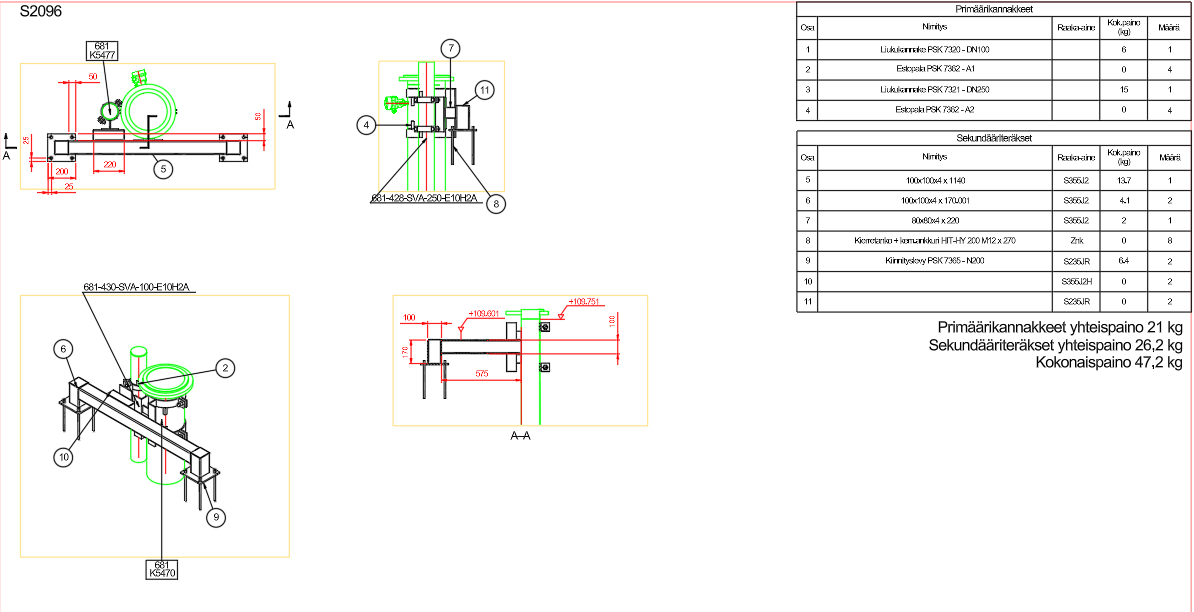
Example support with two pipelines and two support positions. Test data from the supplied presentation.
Drawing content from the model
Views, dimensions, elevation marks, item numbers, parts lists, location diagrams and title block data.
Project drawing status
A docked panel shows missing drawings and identifies drawings that are up to date, outdated or need review.
Controlled regeneration
Apply model changes to the same file as a new revision. The previous revision and manually added annotations are retained.
Workflow
1 Group the support
Assign the same SSTag to the pipe support and its steel. Select the project template.
2 Set the views
Review direction and cropping in the preview. Add a straight or offset section where needed.
3 Generate and review
Produce drawings individually or in a batch. Review the results and approve the drawings.
10-20 seconds per support drawing
Measured in trial batch runs with Plant 3D 2027, using local and cloud projects. The designer reviews the drawings separately. Results depend on data and environment.
More detail
Revisions and approval
A confirmation window lists changes before regeneration. The title block revision and change entry update. Approval adds the reviewer’s name to the title block.
Local and cloud projects
For Autodesk Docs projects, the add-in uses Plant collaboration. It downloads files, checks out drawings for editing and checks in approved drawings.
Batch results
Each support receives a result and any reason for review. Drawings require both a pipe support and steel members. Failed items can be rerun.
Deployment and availability
AutoCAD Plant 3D 2026 and 2027, with local and Autodesk Docs projects. Project-specific drawing templates and title blocks. Illustrated F1 help.
Evaluation checks templates, annotations, revisions and the cloud workflow on your own data before deployment.
Frequently asked questions
What does Support Drawings require?
AutoCAD Plant 3D 2026 or 2027. The add-in works with both local and Autodesk Docs projects.
Can I use my own drawing templates?
Yes. Drawings use your project’s own templates and title blocks.
Are manual annotations kept when a drawing is updated?
Yes. Model changes are applied to the same file as a new revision, and the previous revision and manually added annotations are retained.
How fast are drawings produced?
10–20 seconds per support drawing in trial runs. The designer reviews the drawings separately.
Can I try Support Drawings?
Yes. A trial checks templates, annotations, revisions and the cloud workflow on your own data.
How can I get Support Drawings?
Contact sales@finura.fi. Licensing and pricing are agreed case by case.
Ask about a support drawing trial
Autodesk, AutoCAD, Autodesk Docs, DWG, Forma, Navisworks and Plant 3D are registered trademarks or trademarks of Autodesk, Inc., and/or its subsidiaries and/or affiliates in the USA and/or other countries. Finura Oy is not part of the Autodesk group of companies.